Becoming a Secret Santa Member
5/4/2025
Guide for Secret Santa Participants
The group organiser invites you to the Secret Santa group with an individual link.
Through this link you can confirm your participation, adjust your name, fill in your wish list and – once the draw is done – see who you are giving a gift to.
1. Open the invitation link
- You receive a personal link from the group organiser
- Open the link on your smartphone or computer
- The link is meant for you alone and shows your personal participant view
- No app is required. The page runs entirely in the browser.
2. Accept or decline
As soon as the page opens, you have two options:
- “Accept invitation” → you take part in the Secret Santa
- “Decline invitation” → you opt out and won’t be included
3. Adjust your name
- Before accepting, you can edit your display name if it isn’t quite right
- The name is shown to the group and appears later in the draw
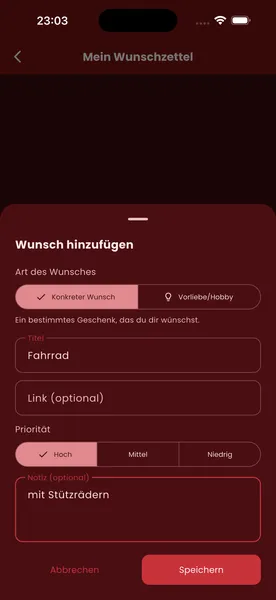
4. Fill in your wish list
- Fill in your wish list (optional)
- Examples: gift ideas, interests, notes (allergies, no-gos, etc.)
- This information helps your Secret Santa find a gift you’ll love
5. Wait for the draw
- Once all participants have accepted, the organiser starts the draw
6. Look up your match
- After the draw, simply open the same invitation link again
- It automatically shows you who you are buying a gift for
- Only you can see this name – the assignment stays confidential
Once the draw has taken place, changes are no longer possible.
Summary
- Open the link → choose whether to take part
- Check your name → fill in your wish list
- After the draw → view your match via the same link
Your individual link stays your personal access point throughout the entire Secret Santa process.