Online Groups
5/4/2025
Creating an Online Group – Step by Step
Important: To create an online group you first need to register and sign in.
Registration is mandatory because the data is stored on a server so that it can be shared with the participants.
1. Register & sign in
- Open the Wichtelrad app
- Tap SignIn and create an account (or use Apple/Google login)
2. Go to “Groups”
- Select the Online Groups tab
- Tap “Create new group”
3. Enter the group basics
- Set a group name
- Description / motto (optional) (premium)
- Choose a location (optional) (premium)
- Set the event date (optional)
- Set a budget (optional)
- Enter your name (required)
- Fill in your wish list (optional)
6. Create the group
- Tap “Save”
7. Invite participants
- Generate an invitation link with “Invite/add participants”
- Share the link via messenger, email or social media
- Note: Participants do not have to download the Wichtelrad app and do not have to register in order to take part. All they get is an invitation link.
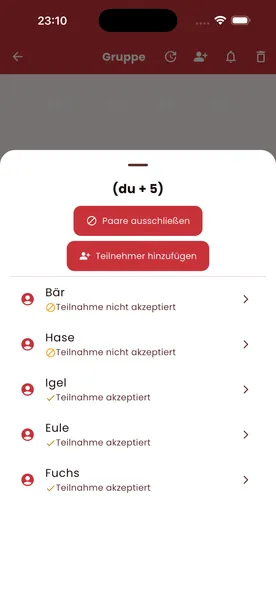
8. Keep an eye on participation status
- Check each participant’s status: joined / declined
9. Start the draw
- Once everyone has joined, tap “Draw”
- The app carries out a fair, automatic draw
- Everyone sees their Secret Santa recipient discreetly under the same link as the invitation
Privacy
- Group data is stored server-side so that it can be shared in sync with all participants
- User accounts can be deleted via the contact form on the website (subject: “Delete account”)