Wish List with Priorities
5/12/2025
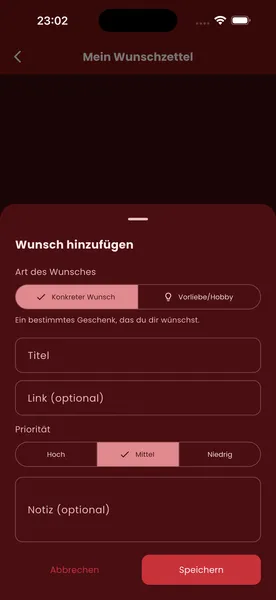
Wish List with Priorities – Gift-Giving Made Easy
To make sure your Secret Santa picks the right gift, you can not only add wishes to your wish list but also give each one a priority.
1. Open your wish list
- Go to “My wish list”
- Tap “Add wish”
2. Choose the type of wish
- Specific wish: a particular gift you would like
- Preference/hobby: a rough pointer if you don’t have anything specific in mind
3. Enter the details
- Title of the wish
- Link to the product (optional)
- Note with further details, e.g. size or colour (optional)
4. Set a priority
- Choose between High, Medium and Low
- That way your Secret Santa knows which wish matters most to you
5. Save
- Tap “Save” – the wish appears in your wish list straight away
- You can add as many wishes as you like with different priorities
Benefits
- More clarity for the gift-giver
- Works even without specific gift ideas (preferences are enough)
- Reduces wrong purchases and duplicate gifts